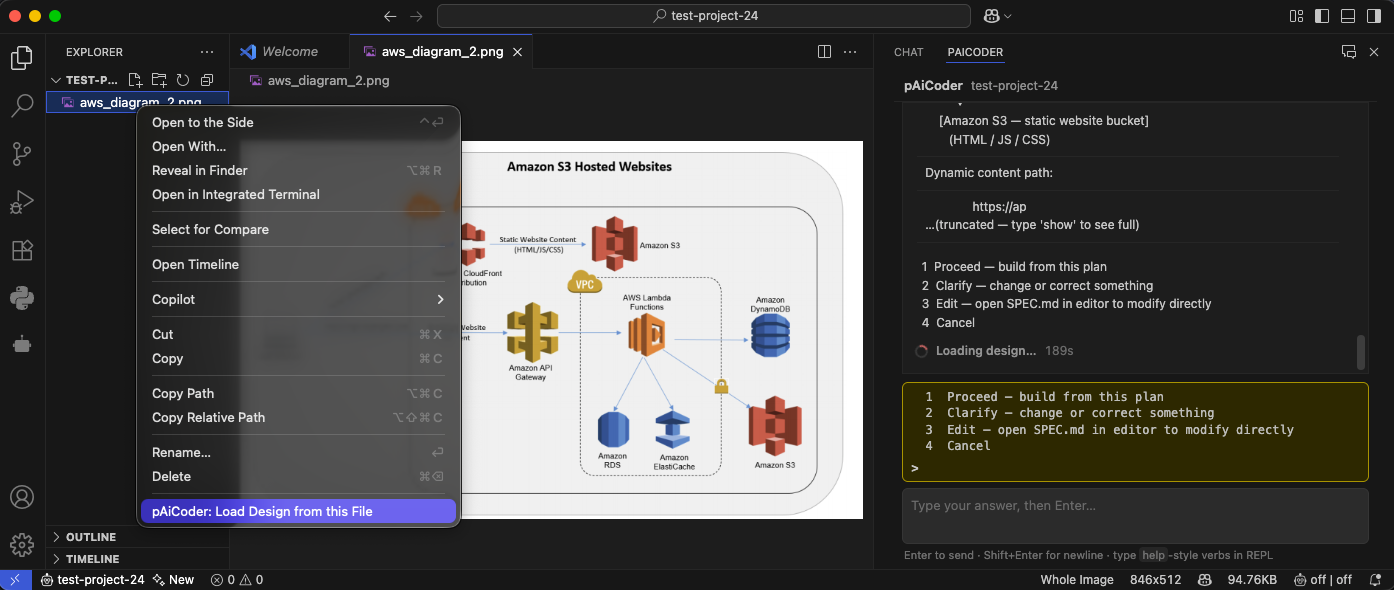
From architecture diagram to production-ready CloudFormation stack — fully automated by pAiCoder.
This system serves a modern web application using a split architecture: static content (HTML/JS/CSS) is delivered globally through a CloudFront-fronted S3 origin, while dynamic content is served through a separate API endpoint backed by serverless compute. This separation lets the static front-end scale and cache at the edge for low latency and low cost, while dynamic business logic runs on-demand in Lambda with access to multiple persistence and caching backends. The design supports a public website (www.example.com) and a distinct API surface (api.example.com) so the two concerns can evolve, cache, and scale independently.
A user opens a web browser and requests one of two hostnames. The two requests take entirely different paths through the system.
The browser resolves www.example.com to an Amazon CloudFront Distribution. CloudFront serves cached static website content (HTML/JS/CSS) at the edge. On a cache miss, CloudFront fetches the object from its origin, an Amazon S3 bucket that holds the static website assets. This gives the front-end global distribution and edge caching without running any servers.
The browser calls https://api.example.com, which resolves to Amazon API Gateway. API Gateway is the single managed entry point for all dynamic requests. It invokes AWS Lambda Functions (the business-logic tier) via native Lambda proxy integration over HTTPS. The Lambda functions run inside a VPC so they can reach VPC-scoped data stores.
From Lambda, requests fan out to the data tier depending on the operation:
So the overall flow is: browser → (CloudFront → S3 static) for the site shell, and browser → API Gateway → Lambda (in VPC) → {DynamoDB, RDS, ElastiCache, S3} for all live data operations. The static and dynamic paths never cross; they share only the browser as a common client.
Static content path:

    [web browser]
         │  www.example.com (HTTP/HTTPS)
         ▼
    [Amazon CloudFront Distribution]
         │  origin fetch (cache miss)
         ▼
    [Amazon S3 — static website bucket]
       (HTML / JS / CSS)

Dynamic content path:

    [web browser]
         │  https://api.example.com (HTTPS)
         ▼
    [Amazon API Gateway]
         │  Lambda proxy integration
         ▼
    ┌─────────────── VPC ────────────────────────────┐
    │        [AWS Lambda Functions]                   │
    │           │      │      │       │               │
    │   ┌───────┘      │      │       └────────┐      │
    │   ▼              ▼      ▼                ▼       │
    │ [Amazon      [Amazon  [Amazon      [Amazon S3   │
    │  RDS]      ElastiCache] DynamoDB]   app-data]    │
    │                                   🔒 (TLS/SSE)   │
└─────────────────────────────────────────────────┘www.example.com.api.example.com; proxies to Lambda.Assumption: 100k dynamic API requests/month, ~50 GB CloudFront transfer, small RDS/ElastiCache instances, modest DynamoDB and S3 usage.
| Component | Est. monthly cost | Notes |
|---|---|---|
| CloudFront | ~$5 | ~50 GB egress + requests; 1 TB free tier first year |
| S3 (static + app) | ~$1 | Storage + requests; 5 GB free tier |
| API Gateway | ~$0.35 | ~$3.50 per million REST requests |
| Lambda | ~$0 (free tier) | First 1M requests + 400k GB-s free |
| DynamoDB | ~$1 | On-demand at low volume; 25 GB free tier |
| Amazon RDS | ~$15 | Single db.t3.micro; 750 hrs free tier first year |
| ElastiCache | ~$12 | Single cache.t3.micro node |
| VPC endpoints / NAT | ~$0–$32 | $0 if using gateway endpoints only |
Rough total: ~$35–$65/month depending on RDS/ElastiCache sizing and whether a NAT Gateway is used.
cloudformation:*
s3:*
cloudfront:*
apigateway:*
lambda:*
dynamodb:*
rds:*
elasticache:*
ec2:CreateVpc, ec2:CreateSubnet, ec2:CreateSecurityGroup,
ec2:AuthorizeSecurityGroupIngress, ec2:CreateVpcEndpoint,
ec2:DescribeVpcs, ec2:DescribeSubnets, ec2:DescribeSecurityGroups,
ec2:CreateRouteTable, ec2:CreateRoute, ec2:CreateInternetGateway,
ec2:CreateNatGateway, ec2:AllocateAddress
iam:CreateRole, iam:AttachRolePolicy, iam:PutRolePolicy, iam:PassRole,
iam:CreatePolicy, iam:GetRole
logs:CreateLogGroup, logs:PutRetentionPolicy, logs:CreateLogStream
acm:RequestCertificate, acm:DescribeCertificate
cognito-idp:*aws configure or environment variables).AWS_REGION in configs.py and parameters.json.STACK_NAME in configs.py..env and replace all YOUR_*_HERE values.www.example.com (us-east-1) and api.example.com.parameters.json.EnableNatGateway parameter accordingly.Files: aws/cloud/stack.yaml, aws/cloud/parameters.json
The complete CloudFormation template defining ALL resources: the static S3 bucket + CloudFront distribution (with OAC to the bucket), API Gateway REST API + custom domain, Lambda functions with their execution role, VPC with private/public subnets, security groups, RDS instance, ElastiCache cluster, DynamoDB table, the app-data S3 bucket, and VPC gateway/interface endpoints for S3 and DynamoDB. All resource names and ARNs must be internally consistent, and parameters.json must have an entry for every Parameter in stack.yaml (region, VPC CIDR, subnet CIDRs, RDS credentials, instance classes, certificate ARNs, domain names, EnableNatGateway).
Files: aws/cloud/deploy.sh, aws/cloud/destroy.sh, aws/cloud/README.md, .env, configs.py
deploy.sh runs aws cloudformation deploy with --capabilities CAPABILITY_NAMED_IAM and the parameters file. destroy.sh runs aws cloudformation delete-stack and waits for completion. It first empties both S3 buckets (static + app-data), since CloudFormation cannot delete non-empty buckets. README.md explains setup and deploy steps.
amazon-s3-hosted-websites/
  SPEC.md                     — this specification (source of truth)
  .env                        — AWS secrets (YOUR_*_HERE placeholders)
  configs.py                  — non-secret config (region, stack name, env)
  aws/
    cloud/
      stack.yaml              — CloudFormation template
      parameters.json         — stack parameters
      deploy.sh               — local deployment script
      README.md               — deployment notes
AWS-DEPLOYMENT.md — architecture overviewwww.example.com → CloudFront, api.example.com → API Gateway.www must be issued in us-east-1.destroy.sh. Note: ACM certs and Route 53 hosted zones created outside the stack are not removed by teardown.| Unknown | Impact | Resolution |
|---|---|---|
| Authentication/authorization layer? | Diagram shows no Cognito or authorizer | Amazon Cognito User Pool + API Gateway JWT authorizer |
| Which datastore is authoritative? | Diagram wires Lambda to both | DynamoDB primary; RDS for relational; ElastiCache cache-only |
| Does Lambda need outbound internet? | NAT Gateway adds ~$32/mo | VPC gateway endpoints only (no NAT) |
| ElastiCache engine? | Affects cluster config | Redis (single node) |
| Multi-AZ / high availability? | Affects RDS and ElastiCache cost | Single-AZ (cost-optimized) |
stack.yaml: BillingMode: PAY_PER_REQUESTstack.yaml ElastiCache resourcestack.yaml DB instance class + MultiAZ: falseEnableNatGateway: false; uses VPC endpointsconfigs.py: AWS_REGIONparameters.json: CloudFrontCertArn